Privacy and data collection
The Privacy section, /?tab=privacy, reports what the TV is configured to do rather than hiding these settings behind its normal menus.
It opens with a summary of screen recognition, ad tracking and usage reports, what is still on under each, and a button that switches all of it off while leaving voice alone. Everything below it is the detail.
It shows whether the content-recognition engine is running and sampling frames, the advertising ID and whether ad tracking is limited, recorded data agreements, and toggles to disable LG's background collection and diagnostics services.
Most data agreements can be switched off from here (persisting across reboots), and the advertising ID can be reset and its cookies cleared. Acceptance of new terms is left to the TV's own menus.
On TVs with a microphone switch on the set itself, such as a C5, What's running now shows whether that switch is on. It is read from the TV and can only be changed at the switch.
LG's on-screen ads and promotions have their own switches: ads in the screen saver, Sponsored tiles and recommendations on the Home screen, ads while watching, and Smart Tips. Each shows only on TVs that have it.
The ad & telemetry blocker blackholes LG's tracking, ad and ACR endpoints, plus common advertising and tracking hosts used by apps and websites, on the TV itself. It bind-mounts a hosts table over /etc/hosts, and is restored on boot.
Two tiers are available:
- ads & telemetry blocks LG's ad, diagnostics and customer-data hosts, the Alphonso screen recognition servers, and 79 common advertising and measurement hosts covering Google/DoubleClick, Amazon, Microsoft/Xandr, ad exchanges and app analytics. It leaves LG's service platform reachable.
- everything adds the hosts that carry LG's platform services, so on that tier the LG ThinQ app can no longer control the TV, and the app store, software updates and LG Channels may stop working. (To stop only LG's system updates, use Block TV software updates on the Advanced tab.)
On the everything tier, after a power cut the TV is left to set its clock from LG's time servers before they are blocked. If its date is still wrong, apps fail to load or install with certificate errors; setting the time by hand, with Set Automatically off under Settings › General › System › Time & Date, fixes that without unblocking anything.
If an app or one of LG's services stops working while the blocker is on, switch it off to check whether it is the cause.
The common-host list is a compact selection checked against StevenBlack/hosts, updated with Native Tv releases. The TV does not download lists in the background. Hosts files match exact names, so unlisted subdomains, apps using their own DNS resolver and ads served from the same hosts as the video can get through. This does not promise ad-free YouTube or other streaming services.
Custom ad blocking, the last row of the Privacy tab's Advanced section, takes a hosts file or a plain list of names from the computer the dashboard is open on. It is a power-user feature: depending on what a list blocks, it can stop apps, LG's services or software updates working.
- Hosts file: Upload a file sends it; names pointed at
0.0.0.0,127.0.0.1,::or::1, and lines of one bare name, are taken, and a line pointing a name at any other address is a redirect and is left out, with the count shown. A name needs a dot, so an ordinary text file is refused. Up to 10,000 names and 1 MB. Uploading switches blocking on. Upload a new file replaces it, and Delete removes it. - Block its names switches the file off without deleting it, to check whether it is what stopped something working.
- What is blocked: Your file and Native Tv's list blocks the file's names as well as the tier's own; Only your file blocks just the file's, so both tiers block the same.
The row shows the file's name, how many names it has and when it was uploaded, and says in place how each action went, with a refusal in the same banner as the page's own errors. The list is blocked only while the blocker is on. The TV keeps it, and Native Tv's own list comes from the version installed, so after an update the names it adds or drops take effect at once and the file is not uploaded again. A name in the file stays blocked when an update drops it from Native Tv's list. LG's time servers in the file are held back after a power cut until the clock is set, as on the everything tier. The TV app shows the list but cannot change it.
After switching away from everything, LG's own apps, such as the Content Store and LG Channels, can take about a minute to connect again: they run in a browser engine that keeps a looked-up address for about a minute. If one shows an error, exit it and open it again after a minute. A restart is not needed.
What ACR collects and what LG Ad Solutions does with it is set out in What LG's ACR does.
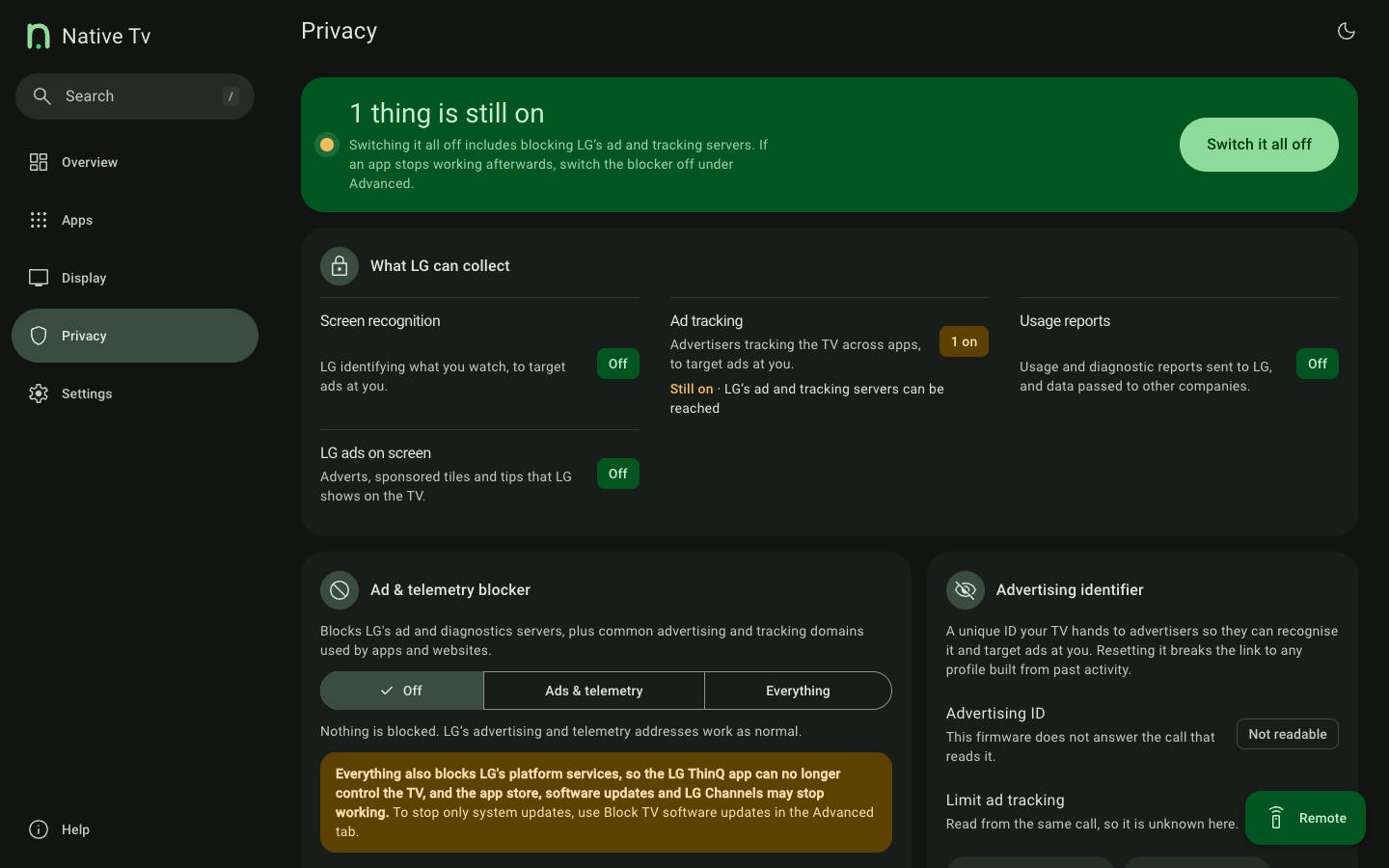
Privacy controls, data agreements, advertising ID, LG telemetry blocking and custom ad blocking.